
We have created a dedicated procedure for the online submission of internship agreements in the laboratory. The process remains unchanged for students but allows for a higher level of interaction between the various parties involved, including your academic program and your laboratory.
As with other types of agreements, you can access the form, enter information, and save it as a draft to complete later before submitting it for validation to your instructor.
Please note: you will need to upload a series of specific documents as a single attachment:
- Identity card
- Student card
- Social security card (INSEE number)
- Civil liability insurance certificate covering internship situations
- Bank details (RIB) (if the internship is paid)* so you can be paid
You can find general information about internships:
https://link.univ-cotedazur.fr/fr/page/faire-un-stage
Some of the administrative information you will need to fill out online may be unfamiliar to you and will require you to contact your tutor, especially the person managing your agreement within your host organization. If this person is not already registered as a convention manager on the platform (check with them), they should request registration by sending an email to link@univ-cotedazur.fr.
You will need to know:
- In the case of a laboratory internship: the funding organization for your internship (e.g., CNRS, INSERM, UniCA, INRAE...) which will be your funding authority.
- In the case of an internship outside iBV, IPMC, INRAE, IRCAN, C3M, you will need to create your host organization profile and provide its Name, Address, and SIRET number. Connect to link: https://link.univ-cotedazur.fr/
To log in, simply use your @etu.univ-cotedazur.fr credentials by clicking "member access" at the top left, then "Intranet login". Please enter a secondary email address, which will serve as your identifier once you graduate.
Select careers -> Internships -> My agreements
Click "apply for an agreement"

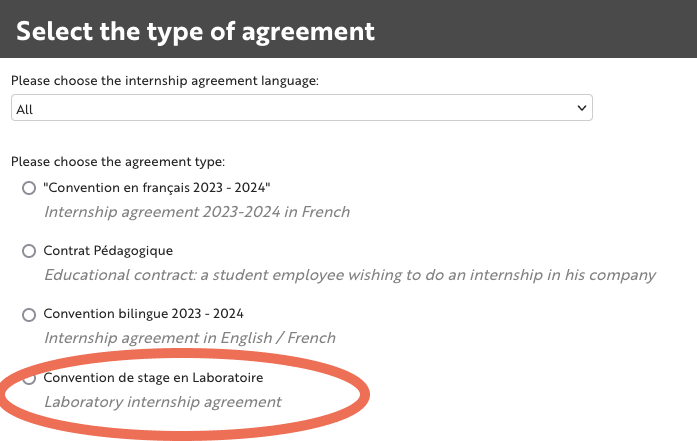
Then select "laboratory internship agreement". Be careful not to choose the wrong model, or you will have to redo the entire procedure.
"STUDENT RELATED INFORMATION".
Check or modify the information entered in this section.
"HOST ORGANIZATION RELATED INFORMATION"
Under "company", indicate the name of the laboratory and then select the funding authority.
Enter the information about the tutor.

"INTERNSHIP RELATED INFORMATION"
Enter all the necessary information about your internship.
"REFERENT TEACHER RELATED INFORMATION"
Please select your reference teacher from the list provided. If your teacher is not listed, please contact your school.
"INFORMATION RESERVED FOR THE LABORATORY"
You only need to enter your social security number here.
The other information must be entered by your host laboratory.
"DOCUMENTS TO BE PROVIDED BY THE STUDENT"
As explained above, you will need to upload as a single attachment:
- Identity card
- Student card
- Social security card (INSEE number)
- Civil liability insurance certificate covering internship situations
- Bank details (RIB) (if the internship is paid)* so you can be paid
It is preferable to compile digital versions using the software of your choice (e.g., Preview for MacOS).
If you only have paper documents and do not know how to scan them into a single file, please follow the CamScanner tutorial.
Send your agreement for pedagogical validation
Once all fields are filled out, you can send your agreement to your referring instructor by clicking "send for pedagogical validation".
You can then track the progress of your agreement in your space.
Send your validation email to your laboratory
This last step allows you to alert your host laboratory that your agreement is ready.
Although they now have the ability to find all agreements made in the host organization, you can inform your manager that your agreement has been validated by your instructor and is ready to be completed by the laboratory.
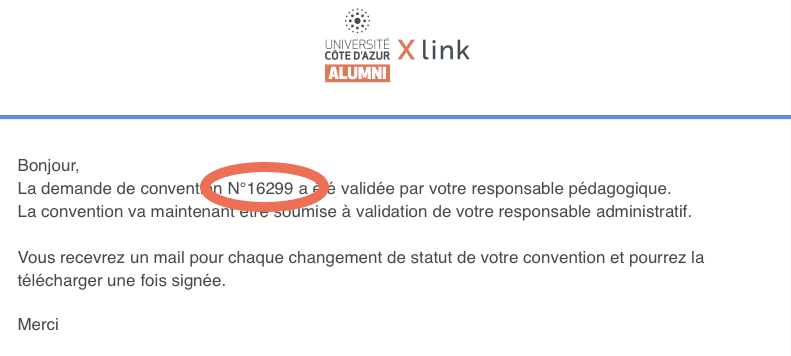
Once your agreement is validated by your instructor or pedagogical referent, you will receive an email with, among other things, your agreement number.
Please send this validation email to your laboratory for validation with the agreement number. This will save you time in the validation process.
If you cannot find the link to declare your agreement, please click the button below:
When you need to sign your internship agreement, here is a tutorial to guide you:
Sign your internship agreement